Wow - never thought that my recent post (Software In Pictures) would become so popular.
Almost 700 views during 2 weeks, and still counting !
I have also received a lot of comments, and the post contents were even discussed in a couple of Linkedin groups. As a junior blogger, I find this very encouraging.
However, naturally, not all feedback is good:
- Some people did not like my "good code" metaphor.
- Some of the other examples were put in other contexts, where they are actually welcome and functional, with good cost-efficiency (such as the door in the wall, that can be used to load goods to an upper floor).
- Some of my examples were seen as possibly offending to the less fortunate populations, that come to these solutions out of necessity, and without a better option.
What I learn from all that:
- The more people read your blog, the more feedback you will receive. And a certain portion of it will be criticism.
- People seem to be more encouraged commenting on topic upon which they disagree, than on topics they do agree upon.
- All feedback is good and welcome. The more feedback I will get for my posts, the more I will learn and the better my next posts will become.
- The more often I write, the shorter will these improvement cycles be.
When thinking of it, it's not so different from building a new product.
As you start, and produce your first prototypes, or even the 1.0 release, most of the feedback will be negative - as chances are that your initial product will suck in some areas.
By collecting the feedback, processing it, and learning from it, you will gradually improve and so will the product.
The negative feedback is indeed the preferred one, since it can help you understand where to focus your next efforts.
So, my bottom line for all the bloggers out there is: write, get feedback, process it, rinse and repeat.
And the same - for the all the product developers out these.
And the more frequently you write/release, the faster the improvement process will happen.
Saturday, July 2, 2011


Saturday, June 25, 2011
Software in pictures
Did you ever try to explain what is "bad code" to someone who does not come from software background ? How do you do that ?
In this post, I would like to visualize some bad design and coding using some real life parallels.
But first a disclaimer: as bad as many of the following examples look like, sometimes compromises need to be made - to meet a short-term deadline, to save cost in the short-term, due to temporary lack of expertise, making some feature work for a customer on the spot, etc.
As long as you acknowledge in advance that what you did is not the right way to do it, and are willing to improve and proceed to apply the proper solution...
First, let's take a look at the equivalent of some messy code.
In this post, I would like to visualize some bad design and coding using some real life parallels.
But first a disclaimer: as bad as many of the following examples look like, sometimes compromises need to be made - to meet a short-term deadline, to save cost in the short-term, due to temporary lack of expertise, making some feature work for a customer on the spot, etc.
As long as you acknowledge in advance that what you did is not the right way to do it, and are willing to improve and proceed to apply the proper solution...
First, let's take a look at the equivalent of some messy code.
 |
| Source: http://bit.ly/jmL7RC |
 |
| Source: http://bit.ly/kiWmRV |
When one of the power lines dysfunctions, how long do you think it would take to fix it ? Or just to find it ?
Same is with bugs in code that looks like this...
Now, how about using a workaround solution rather than upgrading the infrastructure to handle it properly ?
 |
| Source: http://bit.ly/myfL5v |
Sometimes, just because you can make two pieces of software work together doesn't mean you should:
 |
| Source: http://bit.ly/lpx3vE |
Here is how it looks like when you apply a patch rather than rewriting a broken piece of code:
 |
| Source: http://bit.ly/iYIyAa |
And finally, this how is it looks like when you leave some useless code around:
 |
| Source: http://bit.ly/jfFKqE |
For contrast, here is the probable visualization of a good piece of software - fast, sleek, great design, and it gets you to where you want to go to:
 |
| Source: http://bit.ly/jpZAGU |
Do you have any more similar design or code visualizations ?
Friday, June 10, 2011
Your code - keep it covered !
Code coverage by unit-tests (or integration tests - we will not discuss the differences here) is the easiest to add - in many cases much simpler than adding complex end-to-end system tests, and provides good protection against many stupid and easy-to-detect bugs. Here I am only referring to tests that take just a few minutes to run, and can be run as part of the basic build process. No one is saying that it makes the code full-proof against bugs, but no one can argue that having ready tests reduces risks when having to fix a bug or make functionality changes in some code. Code coverage measurement tools are able to provide reports on the portions of code covered by these tests.
Naturally, some developers are adding much more tests on average than others. I don't know where does the lack of writing tests come from - is it out of pressure to meet a deadline, lack of skills or experience, laziness, just not caring, not presenting a sense of ownership ("it's someone else problem"), or any other reason... Also, sometimes, for the same reasons, people tend to remove or disable tests rather than fixing them - either at the same moment, or shortly after committing the code that broke these tests. This, inevitably, leads to having the coverage percentage going down.
Quite for some time, I have been thinking about a method that will hopefully continuously increase code coverage by tests. I am sure that I am not inventing anything new here, but so far I did not encounter any teams that are actually using such a method, and anyway - this is a great way to get feedback on ideas :)
Continuous integration tools, such as Jenkings (former Hudson), have appropriate plugins for displaying code coverage results over time (see a screenshot example) . Moreover, these tools can be configured to mark the build as failed, if the code coverage percentage for the current revision is lower than for the previous revision.
This way, if someone commits code with lower coverage percentage than the current percentage in the trunk (by not writing enough tests for the new/fixed code, or disabling existing tests), the build will be broken, just as if this person committed code that doesn't compile, or caused any tests to fail, and it will require a similar response (either provide a quick fix, or revert the commit).
For example, let's say we start the process at the current state, and we have 40% code coverage by such measurable automatic tests. The above process ensures that we will never go below this coverage percentage. But how do we go up ? Well, statistically, some of the developers will have much higher code coverage on their code, thus moving the overall average higher. This will automatically set a new, higher, goal from that moment on.
But what if adding more tests for some specific change is highly difficult and is not cost effective ?
Well, my suggestion is that in this case, since the developers do not want to break the build, they much compensate by adding tests for different (possibly even unrelated) code, merely so that the overall coverage won't go down. Over time, such an "escape route" will ensure that at least all the easy-to-test areas in code will be well covered.
Of course, reaching 100% coverage is virtually impossible, and also at most times non cost-effective. So we can set a lower percentage threshold (75-85%) for coverage, and once reached, just make sure that the coverage does not go below this threshold. In addition, at all times the code that still does not have code coverage, will be the code for which writing tests is the least cost-effective, or that is better to be covered by more complex system tests, that cannot be run as part of the continuous integration system measurement tools.
I am sure that such an approach is a bit controversial, so I would be happy to hear feedbacks and suggestions how to improve such a method.
My main concern for adoption of such a method is the social concern - how well will it be perceived by the developers, will the developers that indeed lowered the coverage percentage take the responsibility to fix it quickly, or will there be just a continuously "red" continuous integration system status, that no one cares about...
I must say that I still do not have any actual experience or results for this method. Hopefully we will be able to try it in our group in the next months.
I will update on any insights and conclusions as we go...
Naturally, some developers are adding much more tests on average than others. I don't know where does the lack of writing tests come from - is it out of pressure to meet a deadline, lack of skills or experience, laziness, just not caring, not presenting a sense of ownership ("it's someone else problem"), or any other reason... Also, sometimes, for the same reasons, people tend to remove or disable tests rather than fixing them - either at the same moment, or shortly after committing the code that broke these tests. This, inevitably, leads to having the coverage percentage going down.
Quite for some time, I have been thinking about a method that will hopefully continuously increase code coverage by tests. I am sure that I am not inventing anything new here, but so far I did not encounter any teams that are actually using such a method, and anyway - this is a great way to get feedback on ideas :)
Continuous integration tools, such as Jenkings (former Hudson), have appropriate plugins for displaying code coverage results over time (see a screenshot example) . Moreover, these tools can be configured to mark the build as failed, if the code coverage percentage for the current revision is lower than for the previous revision.
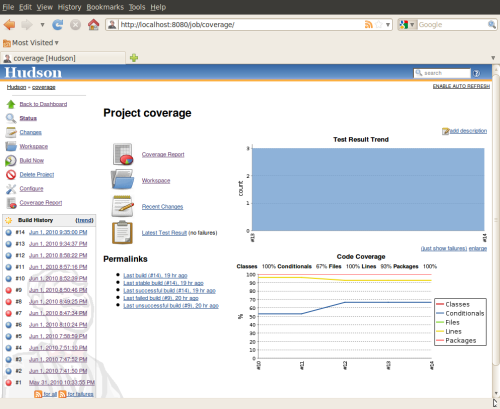
This way, if someone commits code with lower coverage percentage than the current percentage in the trunk (by not writing enough tests for the new/fixed code, or disabling existing tests), the build will be broken, just as if this person committed code that doesn't compile, or caused any tests to fail, and it will require a similar response (either provide a quick fix, or revert the commit).
For example, let's say we start the process at the current state, and we have 40% code coverage by such measurable automatic tests. The above process ensures that we will never go below this coverage percentage. But how do we go up ? Well, statistically, some of the developers will have much higher code coverage on their code, thus moving the overall average higher. This will automatically set a new, higher, goal from that moment on.
But what if adding more tests for some specific change is highly difficult and is not cost effective ?
Well, my suggestion is that in this case, since the developers do not want to break the build, they much compensate by adding tests for different (possibly even unrelated) code, merely so that the overall coverage won't go down. Over time, such an "escape route" will ensure that at least all the easy-to-test areas in code will be well covered.
Of course, reaching 100% coverage is virtually impossible, and also at most times non cost-effective. So we can set a lower percentage threshold (75-85%) for coverage, and once reached, just make sure that the coverage does not go below this threshold. In addition, at all times the code that still does not have code coverage, will be the code for which writing tests is the least cost-effective, or that is better to be covered by more complex system tests, that cannot be run as part of the continuous integration system measurement tools.
I am sure that such an approach is a bit controversial, so I would be happy to hear feedbacks and suggestions how to improve such a method.
My main concern for adoption of such a method is the social concern - how well will it be perceived by the developers, will the developers that indeed lowered the coverage percentage take the responsibility to fix it quickly, or will there be just a continuously "red" continuous integration system status, that no one cares about...
I must say that I still do not have any actual experience or results for this method. Hopefully we will be able to try it in our group in the next months.
I will update on any insights and conclusions as we go...
Thursday, April 21, 2011
Creativity where you don't expect it
Recently, I have encountered two seemingly unusual examples of businesses trying to provide additional value to customers in some rather surprising ways.
The first would be the funerals market (you might have already seen it on the Jimmy Kimmel show last week). What can possibly be innovated in this market ? Well, in Compton, California, the Robert L. Adams Mortuary are now offering a new product: a "drive-by mortuary" - you can drive-through near the open casket of the deceased and depart from the beloved one, all that without even having to leave the comfort of your car.
The second innovator would be McDonald's, that are now offering wedding packages in their branches in Hong-Kong. Apparently, this allows many Hong-Kong citizens the opportunity to get married at reasonable prices, as compared to their other options. McDonald's even offer to supply wedding gowns, made out of balloons, for the happy brides.
So next time you're eating a Big Mac in Hong-Kong, be careful with that ketchup - a bride in a white dress might be just behind you.
Both cases, while probably being rather amusing for a person coming from a different cultural background, are actually great examples of "thinking out of the box". Both are created in rather traditional businesses, they seem to create additional value for their customers and thus increase revenues, without any substantial changes or investments in their business core. So you have to admire the creativity of the marketing and product managers behind these offers.
Makes you think what kind of "additional value" can you create with your software products, with some very little additional investment in development...
The first would be the funerals market (you might have already seen it on the Jimmy Kimmel show last week). What can possibly be innovated in this market ? Well, in Compton, California, the Robert L. Adams Mortuary are now offering a new product: a "drive-by mortuary" - you can drive-through near the open casket of the deceased and depart from the beloved one, all that without even having to leave the comfort of your car.
The second innovator would be McDonald's, that are now offering wedding packages in their branches in Hong-Kong. Apparently, this allows many Hong-Kong citizens the opportunity to get married at reasonable prices, as compared to their other options. McDonald's even offer to supply wedding gowns, made out of balloons, for the happy brides.
So next time you're eating a Big Mac in Hong-Kong, be careful with that ketchup - a bride in a white dress might be just behind you.
Both cases, while probably being rather amusing for a person coming from a different cultural background, are actually great examples of "thinking out of the box". Both are created in rather traditional businesses, they seem to create additional value for their customers and thus increase revenues, without any substantial changes or investments in their business core. So you have to admire the creativity of the marketing and product managers behind these offers.
Makes you think what kind of "additional value" can you create with your software products, with some very little additional investment in development...
Friday, April 15, 2011
Agile Israel 2011 visit summary
On last Monday, April 12th 2011, I have visited the Agile Israel 2011 event.
As a rule, I tried to focus on lectures by guests, especially on guests coming from abroad. I have already received a 2-day Scrum training by AgileSparks representatives in the past, and so preferred to hear things from a fresh angle. I would also like to say "kudos" to AgileSparks for bringing such a large event together, year after year !
The short list of lectures I've attended:
- Keynote: Scrum & XP Beyond the Trenches - Henrik Kniberg
- Agile Software Craftmanship – Principles, Practices and Best Practices - Gal Marder
- Moving from Yearly Plans to Continuous Planning using Lean Product Management – Inbal Oren
- Lean Startup – Guy Nirpaz
- The Dolt’s Guide to Self-organization: How to Make Self-organization Work in an Agile Business – Jurgen Appelo
- Visualizing System Archetypes – Visualization and Systems Thinking – Karl Scotland
- Continuous Deployment – Outbrain Case Study – Itai Hochman
All presentations are available at http://agilesparks.com/AgileIsrael2011Agenda.
Following is a description of the lectures I have attended, followed by some of my notes – in case you are interested reading further into it.
Feel free to scroll through it and read about those that interest you.
The keynote was given by Henrik Kniberg from Sweden (see his blog here, including the slides from the Monday’s presentation) , the author of “Scrum and XP from the trenches”. Recently, with AgileSparks help, it was translated to Hebrew.
He gave a very interesting lecture, extending some of the common scrum ideas with some more advanced thoughts.
Some of the items I’ve collected from the lecture:
- Performing “bug bash” Tuesdays.
- Backlog workshop for the next sprint – perform once a week (for example – every Wednesday) – spreading it over the three weeks of the current sprint.
- Provide estimations only on stories and not on tasks. The tasks are small enough, and the estimations on them do not really help, as long as the whole thing gets done. Each task should be roughly the same size of a few hours or one day.
- Focus factor – estimated from previous sprints.
- Don’t fill the sprint – have it about 70% utilized, leave slack.
- Ask the scrum team about their top 3 impediments (during retrospective) – so as to focus on removing these for the next sprint.
- “King pattern” – one of the stories in the scrum is the top priority – “the king”, and everyone should help to get it done. Once it is done, the next important story becomes the “king”.
- Definition of done:
- Merged to trunk (mainline).
- Acceptance tested.
- No increased technical dept (the code base was not messed up as a result).
- Simple design
- Passes all tests
- No duplication
- Readable
- Minimal
- Story that is “ready for development”: define when something is clear enough and is ready for development. This requires to have the estimations and the acceptance tests ready before starting to develop.
- Tests automation backlog – part of the sprint content and gets some of the time within the sprint.
- Top 5 internal (technical) improvements – part of the sprint content and gets some of the time as well.
Gal is the CEO of Trainologic - a company that focuses on software teaching and consulting. I have attended a 6-day Java course that was passed by him to our group in VMware, and I was impressed already back then by his ideas and ability to present them, so I wanted to attend this one.
The presentation focused on the real day-to-day aspects of programmers who would like to consider themselves as craftsmen, and that being agile is an integrated part of it.
We heard some of the similar ideas from Uri Lavi from the "Software Craftsmanship in Israel" group, and I think it is good to being reminded once in a while what “software craftsmanship” means.
Here are some points I wrote down from this lecture:
- Agile architecture – has more abstract models, less little details.
- Have a high-level architecture modeling – whiteboard sketch is enough. See http://www.agilemodeling.com/ as a resource.
- Models (creating these should take no more than a few days, even for a large project):
- Technology diagram
- UI flow diagram
- Domain model diagram
- Change cases: how will you change the architecture when some assumptions change.
- How much initial modeling should be done ?
- Known technology – none or simple.
- Unknown technology – very little.
- Partially known – little.
- Clean code: code is a way of communication and documentation, therefore it needs to be clean and readable.
- Test-Driven-Development – provides an immediate feedback, serves as a safety net.
I have attended the first 15 minutes of this lecture, but was a bit disappointed - as no ideas were quite new for me, and I did not quite like the way the presentation was made.
One thing he mentioned was a recommended book by Marty Cagan (a former Ebay product manager) – “Inspired: How To Create Products Customers Love” .
So I have moved in the middle to the following lecture.
Lean Startup – Guy Nirpaz:
Guy, the CEO of Totango, was talking about the ways agile and lean startups should choose to increase feedback and value creation.
It is of course relevant not only for proper startups but also for emerging product groups within large companies, such as our APM group within VMware.
Guy is also a great speaker and it was an enjoyable lecture.
Some ideas from the presentation:
- Lean is about speed of execution, not the cost.
- MVP – minimum value product – what is the minimum we can do that will make the customer interested.
- Lean startup – driven by a compelling vision, rigorous about testing this vision.
Jurgen Appelo is from Nederlands, and is the author of the “Management 3.0” book.
His lecture focused on the power of self-organizing teams, and the role of team leaders and development managers in an agile environment, and about ways the manager can move the power to the team.
The manager should be:
- Managing the individuals – making sure the rules are fair.
- Managing the environment – to protect the self-organizing system.
- Tell – make decision as the manager.
- Sell – convince people about decision.
- Consult – get input from team before decision.
- Agree – make decision together with the team.
- Advice – influence decision made by the team.
- Inquire – ask feedback after a decision by the team.
- Delegate – no influence, let the team work it out.
Karl Scotland from the UK comes from Rally Software – one of the leading Agile Consulting and Implementation companies.
His lecture focused on understanding the limits and constraints in our processes and how can we remove or reduce them, and find the root cause and reduce it.
The lecture was on a theoretical level for the most of it (using some “feedback loops” models), but had some good examples.
One initial example he gave: You drink coffee when you’re tired. But the coffee just treats the symptoms, to really treat the tiredness you might want to do more sports, have a more healthy lifestyle, etc…
Some notes from the meeting:
- Put limit on tasks: don’t do more than X things at the same time. Adding more tasks will degrade performance.
For example: do not ever have more than 2 items “in progress”.
The limit needs to be found iteratively – add a task and see how the performance is affected, until the correct balance is found. - Shifting the burden: if you have a resource (a person, a hardware), that is a bottleneck, you need to see how to dissolve it (move skills to others, etc…).
- Limiting the total activity, putting activities into “swimlanes” – so that they won’t interfere one with another.
- Classes of “service” – do prioritization, have different classes of “service” for different issues (for example – different service level for bugs from Beta and bugs not from Beta). Always be able to do the most important stuff first.
Outbrain have mastered an excellent continuous deployment process – a developer commit starts running on production in just 30 minutes. Itai leads the engineering at this company.
Their business is to suggest additional related articles when reading an article/blog, so in some cases there are no severe outcomes from a bug.
On other hand, some of their customers are CNN and Ynet, and their servers receive around 100,000,000 hits a day. Their total deployment is over 100 servers.
Some points on their process and how did they achieved the above:
- They have a lot of very separated and single-responsibility services, having EVERYTHING automated (extremely high automatic tests coverage, automatic monitoring of all the systems, constant self checking of all services and modules).
- Their developers are the total quality owners – there are about 15-20 developers and just 3 QA engineers, who’s role is mostly to help the developers to plan the tests and to implement the automation for the feature, and are a very integrated part of the development process.
- Each developer owns a specific feature, and this reduces the interdependencies.
- Each bug or a problem is analyzed immediately, and for each problem they install measures to avoid it next time (automatic test, additional monitoring ability, etc…).
- All code reviews are posted to reviewboard and are done immediately, and the feedbacks are treated with high priority and are fixed as soon as possible.
- The deployment is done on a staging environment as a first phase, and a portion of the incoming traffic is directed to it.
- They get also immediate feedback on performance and SLA of the new code push (they use Nagios and another tool for SLA, didn’t get the name).
- They use TeamCity for their continuous integration.
- For new features, they use on-off switches (flags) and internal (“hidden”) URLs, so that the QA/PM/Support can play with the feature, while the customer is not exposed to these features. This happens for a short time, after which the flags are removed, and the feature becomes part of the main flow.
That’s it for the long summary.
Hope this was interesting and helped you.
Feel free to follow-up with any questions or suggestions.
Baruch.
Saturday, January 8, 2011
Motivation for Innovation
Everyone is talking about innovation: how to bring innovation to your workplace, how to encourage your employees to be more innovative, etc.
It is clear why innovation is important. Companies want to try many different things, and keep those that work. So they need a lot of innovative ideas. But such innovations are not always developed according to some organized plan. One good example is the invention of the POST-IT by a 3M employee. His motivation was to have an easy way to mark names on seats in his church, and he managed to invent the Post-It in the process.
A colleague of mine had an observation that "laziness" is a strong motivation for innovation. If you are "lazy", you are annoyed by having to do some kind of task or process over and over. Thus you try to look for ways of making this task easier and faster to implement, and thus adopt new tools and techniques for making this task more efficient. Laziness actually becomes a trigger for efficiency.
Innovation can also come simply from looking at some facts and events, analyzing what went wrong (or rather right), learning lessons, and implementing them. "If only we had this and that, this problem would not have happened". Sometimes, the innovative idea was already implemented in this one-time dealing with the problem, but the real innovation step in this process would be to take this one-time occasion and make it a matter of habit.
A colleague of mine had an observation that "laziness" is a strong motivation for innovation. If you are "lazy", you are annoyed by having to do some kind of task or process over and over. Thus you try to look for ways of making this task easier and faster to implement, and thus adopt new tools and techniques for making this task more efficient. Laziness actually becomes a trigger for efficiency.
Innovation can also come simply from looking at some facts and events, analyzing what went wrong (or rather right), learning lessons, and implementing them. "If only we had this and that, this problem would not have happened". Sometimes, the innovative idea was already implemented in this one-time dealing with the problem, but the real innovation step in this process would be to take this one-time occasion and make it a matter of habit.
It seems that some people are more capable of innovation than others - some just "see it", others do not.
However, innovation and execution are two completely different things. There are people who can innovate, and bring their innovation to a certain level of "proof of concept", but lack the abilities to convert this innovation into a successful product. On the other hand, there are those who excel in taking an idea, and converting it into reality - doing the hard implementation work.
It seems that in order to be successful, an organization need both types of people. A startup will usually have a lot of innovators. However, if there are not enough executors, this startup will remain a collection of technological assets, and not become a real business. In contrast, the big companies often lack the ability to innovate, and they compensate by acquiring such startups, and turning this innovation into revenues.
It seems that in many cases, the average employee does not have any strong motivation for bringing innovation into her/his workplace. Most of the people seem to just be inline with whatever work practices and ideas are brought upon them.
In some big companies, such as Google and 3M, innovation is encouraged by allocating dedicated time for it. For example - in Google employees seem to use up to 20% of their time working on innovative ideas. In addition, companies seek the "next great thing" by creating a lot of small "startups" internally - small groups of people are trying to develop new ideas into product prototypes, show a potential lead, experiment with customers. If it seems to be working, the project is elevated. And if not, it is aborted and the people move to work on a new idea. In the quest for innovative products, it is inevitable that some of the leads won't be successful.
So how do you motivate yourself and your people to be more innovative ?
Do you question and reexamine everything you are dealing with, asking questions about whether it can be done better, and how ? Are you encouraging people to constantly try to bring up new ideas ?
Do you allocate dedicated time for trying the new things ?
Does your organization have a spirit of following new leads, and accepting failures as part of the learning and improvement process ?
Are people being aware of the need for innovation, and does it make them be more innovative ?
I would be happy to hear your thoughts and ideas on the subject.
Sunday, October 17, 2010
Tracking your time
I have been looking for some ideas for the first post for a long time. But an occasion came up just yesterday, as I saw a link to RescueTime - a software tool that allows you to measure and breakdown your computer usage time.
This program tracks the usage of different programs, such as the Outlook, text editor, IDE. In addition, within the web browser, it tracks the usage time of different websites.
Now, in addition to the time slicing statistics, it also classifies each program as either productive or distracting, giving you an accurate overall on your productiveness. Any work-related sites are counted as productive, whereas sites like Facebook and Youtube are counted as distracting.
All the data is presented to the user in a nice web-based dashboard, where you can check your statistics, and even put alert rules on different usage patterns.
The program requires the installation of a slim agent on your workstation, that acquires the usage data and sends it to RescueTime website. RescueTime specify which information is collected, transferred and saved, and address privacy concerns.
Now why do I find this tool so interesting ?
Many people participate in many different activities during their work day. But can they quantify it ?
How much time does one spend on average reading and responding to mails ?
How much time does one spend consuming work-related material from web sites, wikis, etc ?
How much time does one spend on actual software development ?
And, not the least important, how much time does one spend on distracting activities ?
A bit of news reading there, some blogs here, checking your Facebook and private email accounts a few times a day, some chatting with friends... How long does all of this take from your day ?
Now, taking short breaks during work is encouraged and in fact shown to increase productivity. So you would just like to know that the time you spend on such distracting activities is reasonable and proportional.
Well - a first step with RescueTime can be just to measure how much of your time is spent on such non-productive activities. And then, you can see how reasonable that amount is, by comparing your stats against those of others.
I am sure that some people are more easily distracted than others. Measuring how much of your work time it actually takes can be a first step to improving your time management and improving the focus on the tasks you have.
I have just started using it myself today, so I will see what I can learn from my own behavior, and I will share these thoughts in my next posts.
Comments are certainly welcome.
This program tracks the usage of different programs, such as the Outlook, text editor, IDE. In addition, within the web browser, it tracks the usage time of different websites.
Now, in addition to the time slicing statistics, it also classifies each program as either productive or distracting, giving you an accurate overall on your productiveness. Any work-related sites are counted as productive, whereas sites like Facebook and Youtube are counted as distracting.
All the data is presented to the user in a nice web-based dashboard, where you can check your statistics, and even put alert rules on different usage patterns.
The program requires the installation of a slim agent on your workstation, that acquires the usage data and sends it to RescueTime website. RescueTime specify which information is collected, transferred and saved, and address privacy concerns.
Now why do I find this tool so interesting ?
Many people participate in many different activities during their work day. But can they quantify it ?
How much time does one spend on average reading and responding to mails ?
How much time does one spend consuming work-related material from web sites, wikis, etc ?
How much time does one spend on actual software development ?
And, not the least important, how much time does one spend on distracting activities ?
A bit of news reading there, some blogs here, checking your Facebook and private email accounts a few times a day, some chatting with friends... How long does all of this take from your day ?
Now, taking short breaks during work is encouraged and in fact shown to increase productivity. So you would just like to know that the time you spend on such distracting activities is reasonable and proportional.
Well - a first step with RescueTime can be just to measure how much of your time is spent on such non-productive activities. And then, you can see how reasonable that amount is, by comparing your stats against those of others.
I am sure that some people are more easily distracted than others. Measuring how much of your work time it actually takes can be a first step to improving your time management and improving the focus on the tasks you have.
I have just started using it myself today, so I will see what I can learn from my own behavior, and I will share these thoughts in my next posts.
Comments are certainly welcome.
Subscribe to:
Posts (Atom)